
By CampusTrack Team
Geofencing Explained: How a Virtual Boundary Takes Attendance
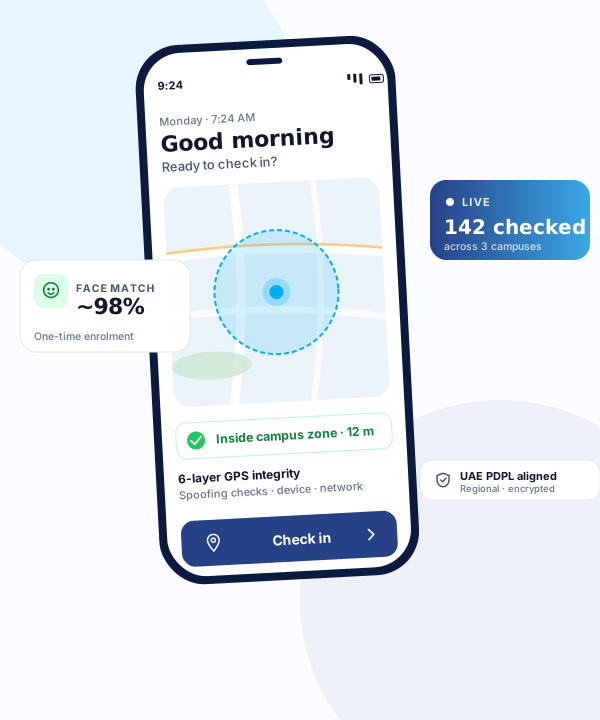
Geofencing is one of the most practical technologies in modern attendance management, yet many business owners are not sure exactly what it means or how it works. In plain language, a geofence is an invisible boundary drawn around a real-world location using GPS coordinates. When an employee crosses that boundary with their smartphone, the attendance system knows they have arrived at (or departed from) their work location. It is simple, effective, and requires no hardware installation.
How geofencing works
A geofence is defined by two things: a centre point (GPS coordinates — latitude and longitude) and a radius (in metres). Together, these create a circular virtual boundary around a location. When you set up a geofence for your office at coordinates 25.2048, 55.2708 with a 100-metre radius, you have created an invisible circle of 100 metres around your office building. Any smartphone with GPS capability can determine whether it is inside or outside this circle.
When an employee opens the attendance app on their phone and taps "check in," the app reads the phone's current GPS coordinates and sends them to the server. The server calculates the distance between the employee's coordinates and the geofence centre. If the distance is less than the configured radius, the check-in is accepted and recorded as location-verified. If the employee is outside the geofence, the check-in is either rejected or flagged for review, depending on the system's configuration.
The entire process takes 2 to 5 seconds and requires nothing from the employee beyond opening the app and tapping a button. There is no hardware to walk up to, no card to swipe, and no fingerprint to scan.
Use cases for geofencing in attendance
Corporate offices: A single geofence around the office building verifies that employees are physically present when they check in. This is particularly relevant for companies enforcing return-to-office (RTO) policies, where the goal is to confirm actual office presence rather than just badge-swiping at the building entrance.
Construction sites: Each active project site gets its own geofence. Workers are assigned to specific sites, and the system verifies they check in from the correct location. When a project ends and a new one starts at a different location, the geofence is simply reconfigured. For large sites, the geofence radius can be expanded to cover the full project area.
School campuses: Schools set geofences around their campus boundaries. Teachers and staff check in when they arrive on campus. For school groups with multiple campuses, each campus has its own geofence, ensuring that staff assigned to Campus A are actually at Campus A. Field trips can be handled by creating temporary geofences at external venues.
Client sites: Security companies, cleaning firms, and field service providers deploy workers to client locations. Each client site is geofenced, and the system verifies that workers are on-site when they check in. This serves dual purposes: internal attendance tracking and client-facing proof of service delivery.
Multiple locations: Retail chains, restaurant groups, and healthcare networks with multiple outlets each define separate geofences. Staff can be assigned to specific locations or allowed to check in at any company location, depending on operational requirements.
Benefits of geofenced attendance
Location verification: The primary benefit is proof that the employee was physically at the work location. This eliminates remote check-ins, where an employee marks themselves as present from home or from a coffee shop near the office.
No buddy punching: When combined with face recognition, geofencing creates a dual-factor verification system. The employee must be at the right place (GPS) and be the right person (face). One person cannot check in for another unless they are also at the same location with the other person's phone — a highly impractical scenario. For a full comparison of verification methods, read our article on GPS vs fingerprint attendance.
Automatic location logging: The system records which geofence the employee checked into, providing automatic site assignment data. For companies that bill clients based on worker presence (security, cleaning, maintenance), this geofence log serves as documentation.
Zero hardware: Geofencing uses the GPS sensor already built into every smartphone. There is nothing to purchase, install, maintain, or replace. Adding a new location is a software configuration task that takes minutes. See how GPS attendance tracking works in practice.
Limitations and honest considerations
Indoor accuracy: GPS accuracy is typically 3 to 10 metres outdoors in open areas. Inside buildings, accuracy can degrade to 10 to 30 metres or more, depending on building construction and the number of GPS satellites visible. For most attendance purposes, this is acceptable — a 50-metre geofence radius comfortably accommodates indoor GPS drift. However, if you need room-level precision (verifying which specific room someone is in), GPS alone is insufficient.
Basement and underground locations: GPS signals do not penetrate well underground. Employees working in basements, underground parking levels, or subway stations may have difficulty getting a GPS fix. Some systems use Wi-Fi positioning or Bluetooth beacons as supplementary location verification in these environments, but standard GPS geofencing will not work reliably underground.
GPS spoofing: Technically, it is possible for someone to use a GPS spoofing app to fake their location. Reputable attendance systems include anti-spoofing measures: detecting mock location providers on the device, cross-referencing GPS with cell tower triangulation, and flagging suspicious patterns (such as an employee whose GPS jumps instantaneously between distant locations). These measures do not make spoofing impossible, but they make it detectable.
Battery and privacy: GPS usage does consume battery, though modern check-in systems only activate GPS at the moment of check-in rather than tracking location continuously. This minimises both battery drain and privacy concerns. Employees should understand that the system records their location only at check-in and check-out — not throughout the day.
Setting up geofences effectively
When configuring geofences for your organisation, consider these practical guidelines. Set the geofence centre point at the main entrance or centre of the building, not at a corner or edge. Use a radius that is large enough to account for GPS drift but small enough to prevent check-ins from adjacent buildings — 50 to 150 metres is typical for standard office buildings. For large campuses or construction sites, increase the radius accordingly. Test the geofence with several employees before rolling out to the full team, checking from different parts of the building and at different times of day. And document each geofence with a clear name and description so that administrators can manage them easily as locations are added or changed.
Looking for GPS geofenced attendance?
CampusTrack uses configurable geofencing with face recognition for location-verified attendance across any number of sites.
Explore GPS attendance trackingFrequently asked questions
How accurate is phone GPS in practice?
Good enough for a site boundary, not for a room. Set the radius to the site rather than the doorway, and expect accuracy to be worse indoors and between tall buildings than an open yard.
Can staff fake their location?
Mock-location tools exist, which is exactly why location on its own is weak evidence. Pairing location with identity verification at the same moment is what closes the gap.
Does geofencing track people all day?
It should not. A defensible setup checks location at check-in and check-out only. Continuous tracking is a different product with different consent obligations, and conflating the two is how a reasonable system acquires an unreasonable reputation.