
An Attendance System Without Hardware
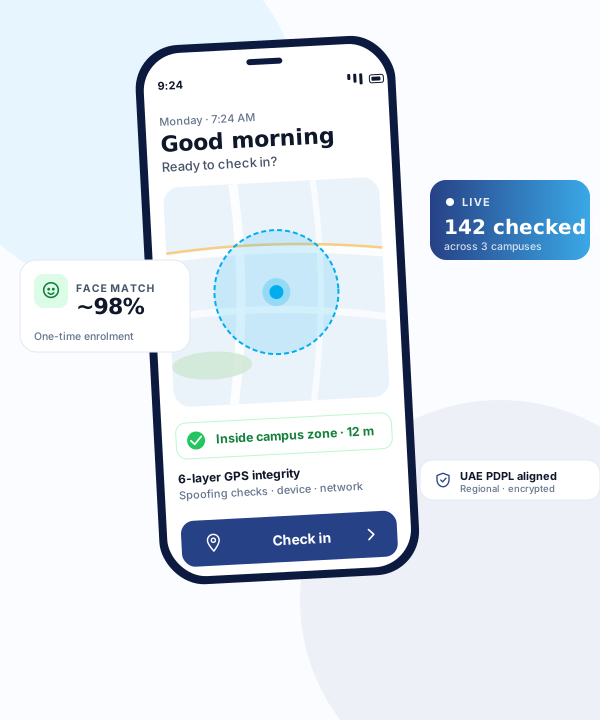
No fingerprint machines. No biometric scanners. No access cards. Staff check in from their own phones using GPS and face verification. Saves AED 20,000+ per site over 3 years vs traditional hardware.
Why Hardware-Free Wins
Five real reasons UAE businesses are ditching biometric machines.
Zero Capex
No devices to buy (AED 500–2,000 each). No network cables. No spare parts inventory. Software-only = operating expense only.
No Breakdowns
Biometric scanners fail from humidity, dust, power surges. UAE climate is especially tough on fingerprint readers. Phones are already weatherproof.
Instant Setup
No installation appointments. No cable runs. No IT tickets. Staff install the app and start using it the same day.
Scales Easily
Open a new site? No new hardware order, no installation. Enable staff in the app, set the GPS zone, done in 10 minutes.
Works Offline
GPS and face matching happen on the device. Check-ins cache and sync when back online. Great for construction sites and large campuses with patchy Wi-Fi.
Always Up to Date
Software-as-a-Service means you get feature updates automatically. No firmware upgrades, no maintenance contracts, no obsolescence.
3-Year Cost: Hardware vs CampusTrack
Based on a typical 100-staff site in Dubai.
| Line Item | Traditional (biometric) | CampusTrack |
|---|---|---|
| Biometric devices (2× redundant) | AED 3,000 | AED 0 |
| Installation, cabling, setup | AED 2,500 | AED 0 |
| Software license (3 years) | AED 15,000 | AED 18,000 |
| Maintenance + replacements | AED 6,000 | AED 0 |
| IT support hours (lost to machine issues) | AED 4,000 | AED 0 |
| Data privacy audit (PDPL) | AED 5,000 | AED 0 (included) |
| TOTAL 3-YEAR COST | AED 35,500 | AED 18,000 |
| You save | AED 17,500 per site (~49%) | |
Rough UAE market estimates. Actual savings vary by site size, existing infrastructure, and staff count. Contact us for a site-specific quote.
“But what about buddy punching?”
Phone-based check-in actually prevents buddy punching more effectively than shared biometric scanners. Here’s why:
Industries Ditching Hardware
Hardware-Free Attendance — FAQ
Can I really have an attendance system without any hardware?
Yes. CampusTrack uses each staff member's smartphone as the attendance device. GPS confirms they're on-site, optional face verification confirms identity. No biometric machines, no access cards.
How accurate is phone-based attendance vs fingerprint machines?
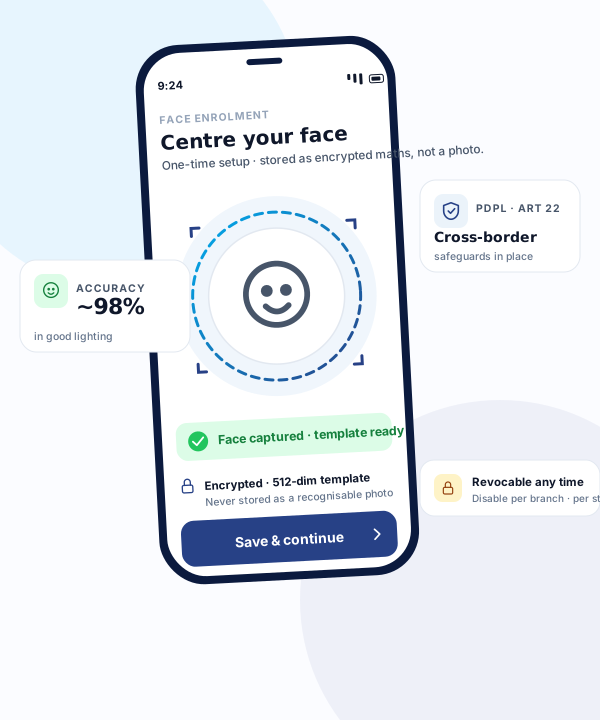
AI face verification reaches ~98% in normal conditions — comparable to mid-range fingerprint scanners. GPS confirms location to within ~10m. 6-layer GPS security prevents fake-GPS apps, photo spoofing, and buddy punching.
What if someone doesn't have a smartphone?
Two options: shared-device mode (one admin phone at entrance), or kiosk mode on a tablet at reception. Still cheaper than a fleet of biometric scanners.
Can staff cheat with photos or buddy punching?
Face verification requires a live selfie matching the enrolled face. Anti-spoofing detects photos and videos. GPS further confirms on-site presence. Combined, it's harder to cheat than shared biometric scanners.
How much does it cost vs hardware?
Free plan for schools <50 staff. Growth AED 949/month (annual promotion; standard AED 1,599) per site — up to 200 staff per campus. Over 3 years, saves approximately AED 17,500 per site vs traditional biometric hardware + installation + maintenance.
Does it work offline?
Yes. The app caches check-ins when offline and syncs when back online. GPS and face verification run entirely on-device. Great for construction sites with patchy Wi-Fi.
When hardware is still the right answer
A comparison that finds no case for the alternative is not a comparison. There are situations where a terminal remains the better choice.
Staff who do not carry a phone
Some roles genuinely do not, and some schools would rather not depend on personal devices at all. A shared device at a fixed point is a reasonable answer to both, and pretending otherwise helps nobody.
A working terminal with life left in it
If the hardware is installed, functioning and the workforce is fully on site at one campus, replacing it is not urgent. The case strengthens as the terminal ages or the school adds sites.
Sites with no connectivity at all
Offline caching handles intermittent signal well. Somewhere with genuinely no connectivity for extended periods is a different problem, and worth saying so before a deployment discovers it.
A regulated process requiring a fixed point
Where a specific process mandates check-in at a designated physical location, that requirement is not something a phone-based approach should be argued around.
Stop buying biometric hardware.
See CampusTrack live on your site in a 20-minute walkthrough. Save AED 17k+ per site over 3 years.
Book a Free Demo