
By CampusTrack Team
Looking Beyond greytHR — A UAE Schools Comparison (2026)
greytHR is one of the most widely deployed HRMS platforms in the region, with a large customer base across India and a growing UAE presence. It is known for mature payroll, deep leave configurability, and a familiar user experience for HR teams who already work with Indian payroll and leave conventions. CampusTrack is a different kind of product — a UAE-native, school-first attendance platform purpose-built for the specific operational shape of UAE schools. This guide walks through the use cases each product is designed for, so you can shortlist the right fit for your school or group.
When greytHR is a strong fit
greytHR has genuine strengths as a full-stack HRMS. It is a sensible choice for UAE entities that are part of an Indian parent group, or for HR teams already trained on greytHR and seeking operational continuity across geographies. Payroll components, leave types, and approval workflows map neatly onto Indian HR conventions that many administrators know well.
Payroll is greytHR’s flagship strength. Complex salary structures, statutory deductions, loan and advance tracking, and flexible reimbursement categories are native. For organisations that want a single tool to handle attendance through to payslip generation in a familiar workflow, greytHR is a mature, capable option.
The module library is broad: recruitment, onboarding, leave, attendance, payroll, expense claims, performance reviews, and helpdesk all sit inside the same product. For small-to-mid-size corporate offices in the UAE with straightforward single-site operations, it is a strong full-stack option.
Support, community, and documentation are well established, which matters during implementation and year-end cycles.
When to choose CampusTrack for a UAE school
CampusTrack is purpose-built for a narrower but deeper use case: UAE schools and multi-campus education groups. Every design decision assumed a school in the Emirates from day one. Where a general HRMS offers broad coverage across all HR domains, CampusTrack focuses exclusively on attendance, leave, and workforce compliance — and builds deeply around the specific needs of UAE schools.
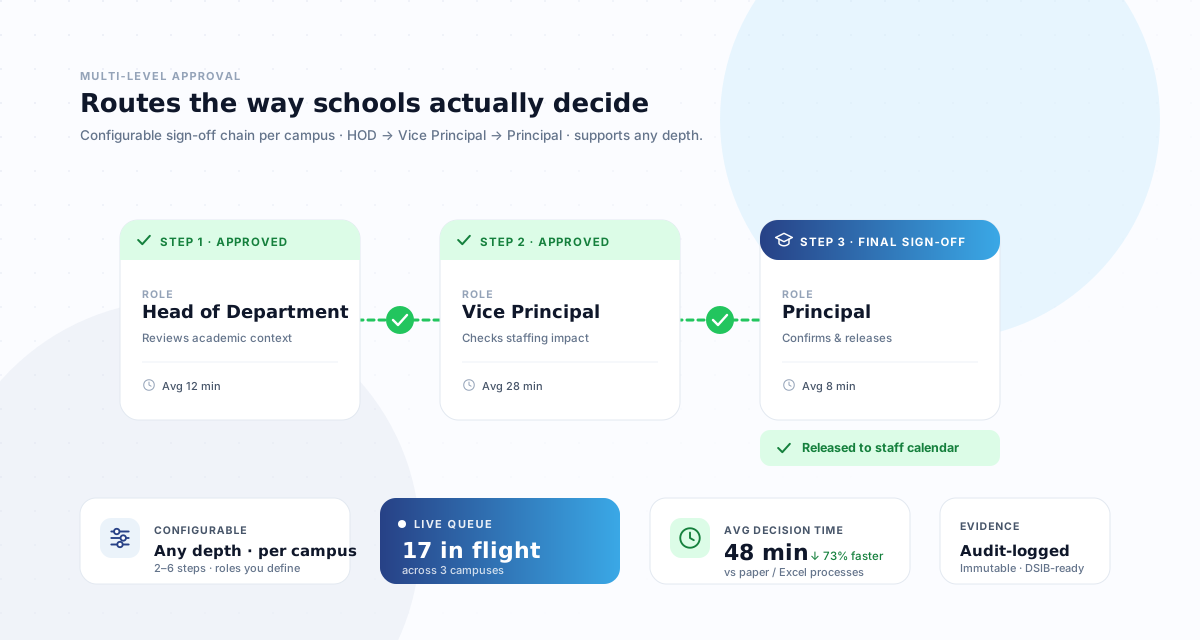
School hierarchy is a first-class concept. HOD, Vice Principal, Principal, and HR are roles in the CampusTrack data model. Approval chains for leave, attendance correction, and substitute requests flow through these roles by default. Changing a Principal is a single assignment change, not a workflow rebuild.
Academic calendar awareness. Terms, exam weeks, mid-term breaks, early dismissal days, public holidays, and substitute coverage are native concepts. Teacher attendance respects the academic year rather than a generic corporate calendar.
Dubai and Abu Dhabi school inspection authorities report templates built in. Staff qualification tracking, teaching load per teacher, attendance ratios, and substitute coverage reports are ready to export. During a Dubai school inspection, the Principal exports a PDF in one click rather than asking the IT coordinator to rebuild the teacher report.
Hardware-free attendance. GPS geofencing plus optional AI face verification from the staff member’s own phone, with a 6-layer anti-spoofing framework designed to defend against mock-location apps, photo attacks, and geofence manipulation. No devices to buy, no maintenance contracts. See attendance without hardware for the full approach.
UAE-native as the default. WPS-compatible SIF exports, UAE Labour Law-aligned leave categories, UAE PDPL-aligned data handling with Article 22 transfer safeguards, Arabic-capable UI, and UAE business-hours support all ship out of the box rather than requiring configuration projects.
Per-site pricing. One flat fee per site for up to 200 staff. A 50-staff branch and a 500-staff branch pay the same Standard fee. This aligns pricing with how schools scale — by adding campuses, not padding headcount.
Best-fit summary
| Platform | Best fit for |
|---|---|
| CampusTrack | UAE schools and multi-campus groups needing Dubai school inspection-ready reports, academic-calendar-aware attendance, strict branch isolation, hardware-free GPS and face check-in, and UAE-native WPS and UAE Labour Law compliance as defaults. |
| greytHR | Organisations wanting a mature full-stack HRMS with deep payroll, broad module coverage (recruitment, LMS, performance, expense, helpdesk), and a familiar experience for HR teams who already work with Indian payroll and leave conventions. |
Use cases CampusTrack is purpose-built for
Here are the concrete UAE school scenarios where CampusTrack was designed to shine. If any of these match your school or group, CampusTrack is worth a closer look.
1. UAE schools preparing for Dubai or Abu Dhabi school inspection inspections. Dubai and Abu Dhabi school inspection authorities inspections explicitly look at teacher presence, qualifications, teaching loads, and substitute coverage. CampusTrack ships with ready-to-export templates for each of these report types.
2. Multi-campus school groups needing strict branch separation. Multi-campus groups need consolidated group-HR visibility with branch-scoped access for each Principal. CampusTrack enforces this isolation at the database layer.
3. Schools running HOD → VP → Principal → HR approval chains. Leave, attendance correction, and substitute requests all flow through this specific approval structure by default — without building custom workflows.
4. Schools moving away from biometric hardware. Many UAE schools have decided to retire biometric attendance hardware in favour of phone-based GPS plus face verification. CampusTrack is designed ground-up around this model.
5. Schools with high casual and substitute headcount. Per-site pricing means casual invigilators, substitute teachers, and activity coaches don’t inflate the monthly bill. A branch with 50 permanent staff and 80 casuals pays the same Standard fee as a branch with 50 permanent staff and none.
6. Schools with UAE PDPL data-handling requirements. CampusTrack processes UAE customer data on enterprise-grade cloud infrastructure, encrypted at rest and in transit. The primary processing region is outside the UAE, so transfers carry the safeguards UAE PDPL Article 22 requires, and a UAE-focused Data Processing Addendum is available on request.
Pricing approach
The two products use different pricing models, which suit different organisations.
CampusTrack charges per site, not per employee. The Free plan covers schools under 50 staff at zero cost. The Growth plan is a flat AED 949 per site per month for up to 200 staff. The Full HRMS plan handles multi-site groups with custom pricing. See the CampusTrack pricing page for current rates.
greytHR uses a per-employee tiered model with different bundles depending on the modules in scope. Because vendor pricing changes and depends on module selection, we recommend getting a current quote directly from greytHR for your specific headcount and feature mix.
For schools with significant casual and substitute headcount, per-site pricing tends to be more predictable as the roster changes month to month. For organisations primarily paying for permanent staff across the full HR stack, a per-employee bundle may suit the profile well. Model both against your real roster.
Scenario: an Indian-curriculum school group in Dubai with 800 staff
Consider an Indian-curriculum school group running four branches across Dubai and Sharjah. Total staff is around 800 — teachers, teaching assistants, operations, security, transport drivers, and cleaning. The group HR director has a long greytHR background. The CFO likes the idea of one HR platform across the group.
A valid direction is to standardise on greytHR across the group and keep a familiar HR UX. Another valid direction is a pragmatic split-stack: run CampusTrack for attendance, leave, and Dubai school inspection-readiness, and keep greytHR (or a payroll-focused tool) for payroll. The split lets the HR team keep the payroll workflow they already know, while school leadership gets reports that map directly to Dubai school regulatory framework’s questions, and IT admin time spent reformatting Excel exports drops significantly.
The honest recommendation: demo both options, use your actual multi-campus structure and real Dubai school inspection report templates, and decide based on which split matches your operational reality.
Migration playbook
Moving attendance from another HRMS to CampusTrack follows a predictable five-week pattern.
Week 1. Export and map. Export employee master, leave balances, and historical attendance as CSV. CampusTrack provides a mapping workbook; HR admin spends 3–4 hours aligning fields. IT is not required at this stage.
Week 2. Branch and hierarchy setup. The CampusTrack onboarding team configures branches, academic calendars, approval hierarchies, and Dubai school inspection report templates. Schools typically review and sign off within two to three working days.
Week 3. Staff onboarding. Staff download the CampusTrack app, complete face enrolment (about 90 seconds per staff member), and are briefed on the check-in flow. For schools with 800 staff, onboarding takes three to five days total, batched by branch.
Week 4. Parallel run. CampusTrack runs alongside the existing HRMS for one pay cycle. HR validates outputs. If helpful, historical data from the existing HRMS can be imported into CampusTrack as read-only reference records for audit continuity.
Week 5 onward. Cutover. CampusTrack becomes authoritative for attendance and leave. The existing HRMS (or a dedicated payroll tool) continues to receive monthly exports from CampusTrack. Biometric devices, if in use, can be decommissioned or retained as a fallback based on the school’s preference.
Frequently asked questions
Q: Can we keep using our existing HRMS for payroll and just switch attendance to CampusTrack?
Yes. This is the most common migration pattern. CampusTrack exports monthly attendance and leave summaries that import cleanly into most payroll tools and UAE WPS banks.
Q: What happens to historical attendance data in our current HRMS?
Two options. Keep the existing HRMS running in a read-only state as a historical archive, or import historical data into CampusTrack as reference records. Most schools choose the first option.
Q: Does CampusTrack support the Arabic language?
Yes. The UI supports English and Arabic. Reports can be generated in either language, and staff can switch their individual preference.
Q: We have existing biometric devices. Can they continue to work?
CampusTrack does not require biometric devices and does not directly integrate with third-party fingerprint hardware. Most schools phase out devices during migration. If you have a specific operational reason to keep devices, we can discuss hybrid setups.
Q: How does CampusTrack handle UAE school inspections?
Dubai and Abu Dhabi school inspection authorities report templates are built in. Typical inspection requests — teacher attendance ratios, qualifications, substitute coverage, punctuality trends — export as PDFs in one click. Schools have used CampusTrack reports directly in Dubai school inspections without post-processing.
See CampusTrack for your school
Book a free 20-minute demo. Bring your campuses, headcount, and Dubai school regulatory framework reporting needs — we’ll walk through inspection-ready reports, multi-campus isolation, GPS and face check-in, and whether CampusTrack is the right fit for your school or group.
Book a Free DemoRelated reading
Attendance System Dubai
The cloud-based attendance system built for Dubai businesses
CampusTrack for Schools
Purpose-built attendance and HR for UAE schools and multi-campus groups
Teacher Attendance System
Academic-calendar-aware attendance built for UAE teachers
CampusTrack Pricing
Per-site pricing with a free tier for schools under 50 staff