
By CampusTrack Team
How Multi-Campus Schools Manage Staff Attendance
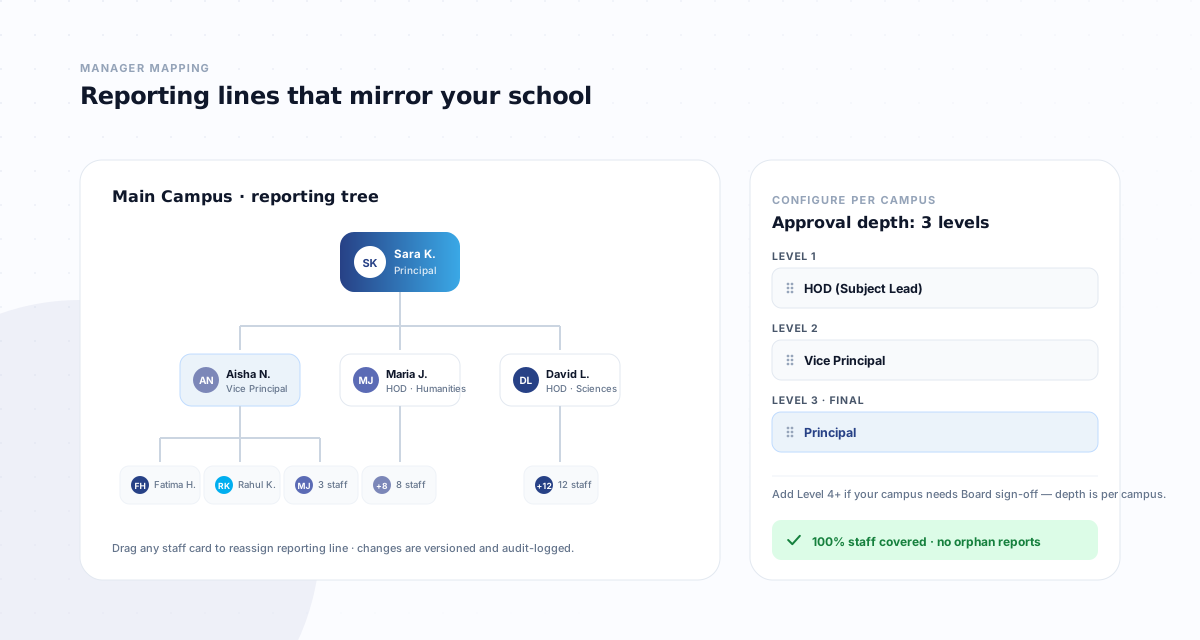
School groups operating multiple campuses face a unique set of challenges that single-campus solutions were never designed to handle. From data isolation between branches to unified reporting at the group level, multi-campus attendance management requires a fundamentally different architecture.
The branch isolation challenge
Each campus operates semi-independently — its own principal, its own HR processes, its own staff roster. A school admin at Campus A should never see attendance data from Campus B. Yet the group head office needs visibility across all campuses simultaneously. This dual requirement — isolation at the branch level, aggregation at the group level — is the core architectural challenge.
Unified policies, local execution
Education groups typically want consistent policies — the same shift structures, the same leave types, the same approval workflows. But each campus may have different operating hours, different holiday calendars (curriculum-specific), and different staffing patterns. The ideal system enforces group-wide standards while allowing campus-level configuration where needed.
The GPS advantage for multi-campus
Hardware-based attendance systems require installation at every campus entrance. When a school group adds a new campus, they face a new procurement cycle. GPS geofencing eliminates this entirely — defining a new campus zone is a five-minute configuration task. Staff who float between campuses can check in at whichever location they are working that day. This same GPS approach is used across construction and multi-site industries.
Role hierarchy across campuses
Multi-campus operations need at least four role levels: employees who see only their own data, managers who see their team, campus principals who see their entire school, and group-level administrators who see everything. Each level must be enforced at the database query level — not just the user interface. A good teacher attendance system treats these role boundaries as first-class security constraints, not UI filters.
What to look for in a solution
When evaluating attendance platforms for a multi-campus school group, the key questions are: Does it enforce data isolation between branches at the backend level? Can group administrators switch between campus views? Does it support role-based access control with at least four tiers? Can new campuses be added without hardware procurement? And does it provide consolidated reporting across all branches? For a deeper look at how these patterns are implemented, see our multi-campus management overview and our article on managing staff attendance across multiple school campuses.
The problems that only appear at group scale
Running four schools is not running one school four times. A handful of problems exist only above a single campus, which is exactly why single-campus systems have not solved them:
- Staff who belong to more than one site. A peripatetic music teacher or a floating cover supervisor works across campuses. Systems treating a branch as a hard boundary force a duplicate record, and then the leave balance exists twice.
- Comparisons that are not comparisons. When each campus defines its own leave types and shift patterns, a group report compares different things while looking like it compares the same thing.
- Approvals that cross campus lines. A branch principal approves within their school; a group HR director sits above all of them. A chain that understands one level cannot express that, so it moves to email.
- Transfers that lose history. Staff moving between group schools should keep service dates and accrued leave. Recreating them at the new site resets what the group already knows about them.
Standardise the masters, not the day
The instinct when a group grows is to standardise everything, and it reliably fails at the site that does not fit. A newly opened campus, a nursery inside a school group, or a site running a different working week will quietly abandon a standard that makes their day harder.
The workable split is to standardise the things that make comparison possible — leave types, designations, approval templates, reporting periods — and allow documented exceptions on the things that reflect genuine operational difference. Group leadership gets figures that mean the same thing across campuses; individual sites keep the flexibility that makes the system usable where they are.
Roll out one campus at a time
Simultaneous launches across a group multiply problems rather than dividing effort. A single campus for two weeks surfaces every assumption that was wrong — the geofence drawn too tight, the shift pattern nobody mentioned, the supervisor who needs an approval right they were not given. Fixing those once, before they exist in four places, is the difference between a rollout and a recovery.
CampusTrack supports multi-campus from day one
Branch isolation, 5-level RBAC, group-wide dashboard, and new campus setup in minutes — not months.
Learn about multi-campus featuresFrequently asked questions
What breaks first when a school group grows?
Usually the masters. Leave types, shift patterns and grade scales drift apart campus by campus, and consolidated reporting quietly stops being possible without someone mapping them by hand.
Should we roll out to every campus at once?
One campus first, then the rest. The first rollout finds the configuration questions nobody anticipated, and finding them once is far cheaper than finding them simultaneously in four places.
Should campus heads be able to see other campuses?
Not by default. A role hierarchy that scopes a campus head to their own campus and gives group administrators the consolidated view is the arrangement that survives contact with an HR dispute.