
Shift Management Software for the UAE
AI-drafted weekly schedules with Friday prayer break, lunch, and Saturday off auto-detected. UAE Labour Law compliance check on every roster — for schools, healthcare, security, and construction.
UAE Labour Law-aware · Multi-site · Mobile-first · Free up to 50 staff
Schedules in plain English. UAE compliance built in.
Building shift rosters by hand for 50, 200, or 2,000 staff in Excel is slow and error-prone. Generic shift tools don't understand UAE realities — Friday half-day with prayer break, Saturday off, Ramadan reduced hours, prayer windows in multi-faith staff schedules, UAE Labour Law working-hour limits. CampusTrack lets you describe the shift in plain English; the AI drafts a structured schedule, runs the UAE Labour Law check, and waits for HR to confirm. The output goes straight to the same attendance system your staff already use.
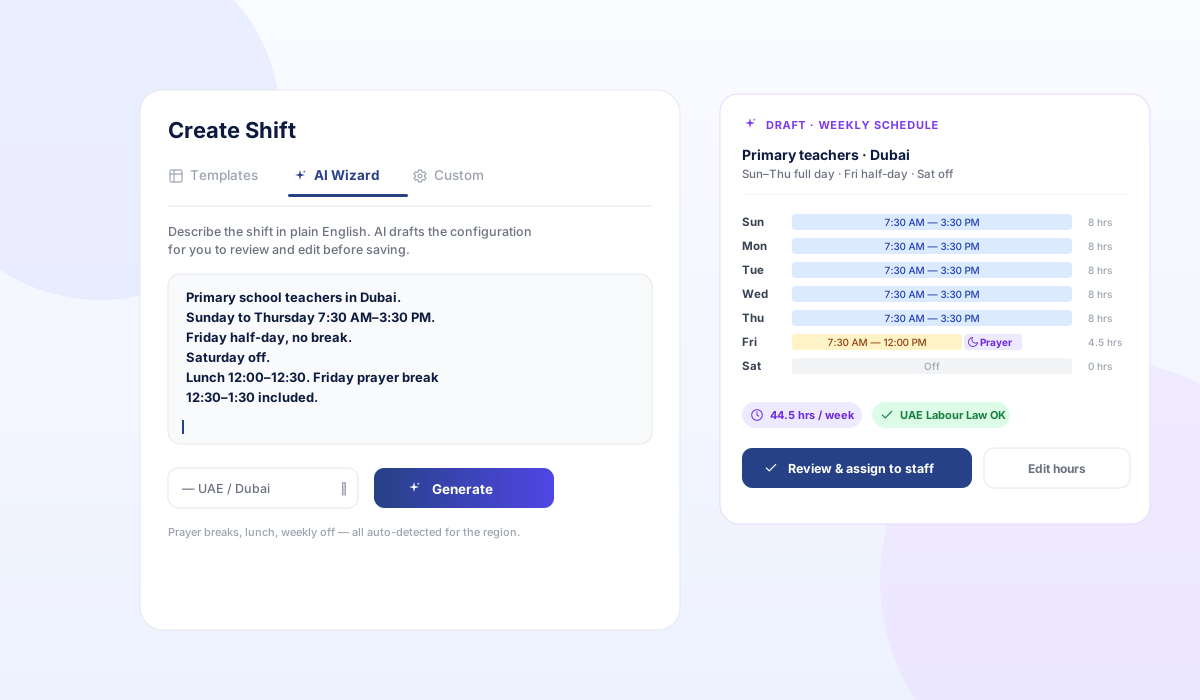
Plain English describes the shift. AI parses it into a structured schedule. UAE Labour Law check runs automatically. HR confirms before staff see anything.
Describe shifts in plain English
Type "Primary teachers Dubai, Sun–Thu 7:30 AM–3:30 PM, Friday half-day with prayer break, Saturday off, lunch 12:00–12:30." AI drafts the full weekly grid in seconds.
Friday prayer break auto-handled
For UAE-region shifts, Friday 12:30–1:30 PM is preserved as a prayer break by default. Configurable per site, faith group, or business hours.
Lunch and break exclusions
Configurable per shift (e.g. 12:00–12:30 for primary, 13:00–14:00 for secondary). Excluded from billable hours by default; included for salaried staff with overrides.
Sun–Thu / Fri–Sat / 24×7 patterns
Pre-built templates: school week (Sun–Thu + Fri half), construction (Sun–Fri 8 hr), healthcare (24×7 with night shifts), security (12 hr posts with rotation), retail (mall hours).
Shift swaps and substitutions
Staff request swaps from their phone; AI checks who is available and compliant (no overtime breach, no qualification mismatch). Manager approves with one tap.
UAE Labour Law check on every roster
Working-hour limits, mandatory rest day, overtime caps, and end-of-shift rest periods checked automatically per Federal Decree-Law No. 33 of 2021. Violations blocked before publish.
Mobile-first for staff
Staff see their roster on their phone with calendar export. Swap requests, leave clashes, and shift reminders all in-app. No login portal needed for read-only views.
Linked to attendance + payroll
Scheduled hours auto-flow into the attendance system. Variance from scheduled-vs-actual is reported. WPS payroll exports use scheduled hours minus exceptions.
From plain English to live roster
- Describe the shiftPlain English. Day pattern, hours, breaks, who it applies to. The AI Wizard tab in the Shift screen.
- AI drafts the structured scheduleWeekly grid with hours per day, breaks excluded, prayer break callouts. Total weekly hours computed.
- UAE Labour Law checkWorking-hour limits, weekly off, rest periods, overtime caps. Violations highlighted before HR can save.
- HR reviews and assignsHR confirms or edits the draft, then assigns staff. Bulk-assign by department, branch, or designation.
- Live in attendanceStaff see the roster on their phone; check-ins are validated against scheduled hours; variance reported.
Built around UAE compliance, not adapted to it
UAE Labour Law — working hours
Federal Decree-Law No. 33 of 2021 caps daily working hours and mandates rest periods. The AI shift check enforces these before HR can save a roster.
Ramadan reduced hours
Auto-applied during Ramadan dates: 2-hour reduction for fasting staff (configurable per role). Schedules update; staff are notified.
Friday prayer break
UAE-region shifts preserve a Friday prayer break window (12:30–1:30 PM by default, configurable). Excluded from billable hours.
PDPL on roster data
Staff roster, leave history, and shift assignment data is encrypted at rest and access-controlled per branch or site. Shift data is never sent to third-party services.
Frequently asked questions
Can the AI handle complex multi-shift rotations?
Does it work for Ramadan?
Can I import existing rosters from Excel?
How does it integrate with payroll?
Is it really plain English, or is it just a form?
Draft a roster in plain English in your demo
In your 20-minute walkthrough we will describe a real shift from your reality and the AI will draft the schedule live. You will see the UAE Labour Law check run.